
IPTV UK Installation Guide | 7 Easy Steps To Set Up Your Subscription
After you place your IPTV UK order, our support team will walk you through every step of installing your subscription on any device Firestick, Android, Smart TV, iOS, Windows and MAG Box.
IPTV UK Installation Guide — How To Install on Amazon Firestick (2025)
The easiest way to enjoy your subscription on Firestick is via IPTV Smarters Pro. Our IPTV UK service is fully compatible with all Firestick models.
1st Step: Watch this video it shows you how to allow downloading apps from Unknown Sources using the Downloader app on your Firestick.
2nd Step: Download IPTV Smarters Pro to access your streaming service. Go to Firestick's Downloader and enter this code: 4839527
You can also download our Best IPTV UK APP — Downloader code: 7709919
Need help? How to download our app →
Once installed, enter the login credentials we send you after your purchase. Start watching 40,000+ channels instantly.
How To Install IPTV UK on Android Phone
Watch all your channels on Android with IPTV Smarters Pro — the top-rated app for your UK IPTV subscription.
Video Tutorial: Watch the Android setup guide →
IPTV UK installation guide for Android — step by step:
Step 1: Download IPTV Smarters from: smarters.apk
Step 2: Open the app and enter the login details sent by our team.

Step 3: Enter your credentials and click "ADD USER".
Step 4: Wait a few seconds for your channels to load.
Step 5: Click on the "Live TV" icon.
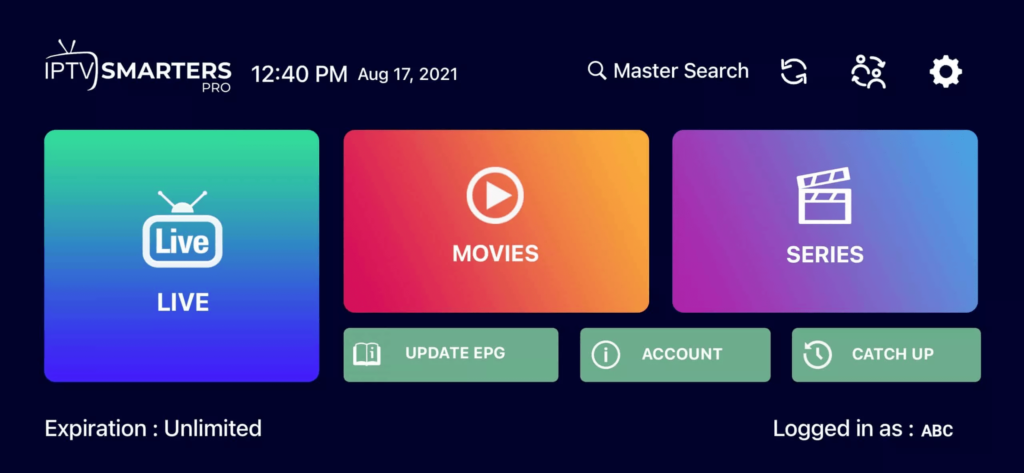
Step 6: Select your favourite channel group sports, movies, news and more.
Step 7: Click a channel and double-tap for full screen. Done!
How To Install IPTV UK on Android Smart TV
Enjoy your subscription on Android Smart TV with full 4K quality and access to all live channels.
Video Tutorial: Watch the Smart TV setup guide →
Step 1: Download IPTV Smarters: smarters.apk
Step 2: Open the app and enter your login details.
Step 3: Enter your UK IPTV subscription credentials. Click "ADD USER".
Step 4: Wait a few seconds.
Step 5: Click on "Live TV".
Step 6: Browse and select your channels.
Step 7: Click a channel and double-tap for full screen. Done!
How To Set Up IPTV UK on iPhone / iPad (iOS)
Get your subscription working on any Apple device in minutes. Access all channels on your iPhone or iPad.
Step 1: Download IPTV Smarters Pro from the Apple App Store.
Step 2: Open the app and enter your login details.
Step 3: Enter the credentials from your best IPTV UK purchase. Click "ADD USER".
Step 4: Wait a few seconds.
Step 5: Click "Live TV" to start streaming.
Step 6: Choose your channel group — Sky Sports, BT Sport, BBC and more.
Step 7: Tap a channel, double-tap for full screen.
Step 8: To add EPG, click "Install EPG". Done!
How To Set Up IPTV UK on Windows or Mac
Watch your subscription on PC or Mac with full HD and 4K quality the easiest way to stream from home.
Windows
Download IPTV Smarters Pro for Windows — the best player for our IPTV service UK.
Mac / MacBook
Download IPTV Smarters Pro for Mac and enjoy your streaming on MacBook.
How To Install IPTV UK on Samsung / LG Smart TV
Set up your subscription directly on your Smart TV and enjoy all channels on the big screen.
Step 1: Download SetIPTV / HOT IPTV / ibo Player from your Smart TV app store (Samsung, LG…)
Step 2: Open the app — you will see your MAC Address on screen.

Step 3: Send us your MAC address via WhatsApp / Email / Live Chat our support team will activate your IPTV UK account.
Step 4: Restart your TV and open the app. Done!
How To Set Up IPTV UK on MAG Box / Formuler Box
Activate your UK IPTV subscription on MAG or Formuler Box one of the best ways to stream in HD.
Step 1: Send us the MAC Address of your MAG Box via WhatsApp / Email / Live Chat.
Step 2: After payment, our team will send you the portal link to configure your device. You'll have access to 40,000+ channels within minutes.
Need help? Contact our support team →